
Write Credentials
Write credentials let supported engines connect to Fivetran Catalog with read and write access. You can use these credentials with engines such as Snowflake, DuckDB, and Apache Spark.
You can use write credentials to:
- Create and manage your own schemas and tables
- Create transformation and analytics tables from Fivetran-delivered data
- Insert, update, delete, and merge data in tables that you create
- Manage your own tables in the same Fivetran Catalog as your Fivetran-delivered tables
Fivetran manages the tables that it delivers from your source systems. Although write credentials also provide access to these tables, modifying them directly can corrupt the tables, cause sync failures, or produce unexpected results.
To connect with read-only access, see the Fivetran Catalog Integration Guide.
Find your write credentials
Account Administrators and Destination Administrators can access write credentials in the Fivetran dashboard.
In your Fivetran account, go to Destinations.
Select your Managed Data Lake Service destination.
Go to the Write Credentials tab.
Copy the following values:
- Polaris server endpoint
- Catalog
- Client ID
- Client secret
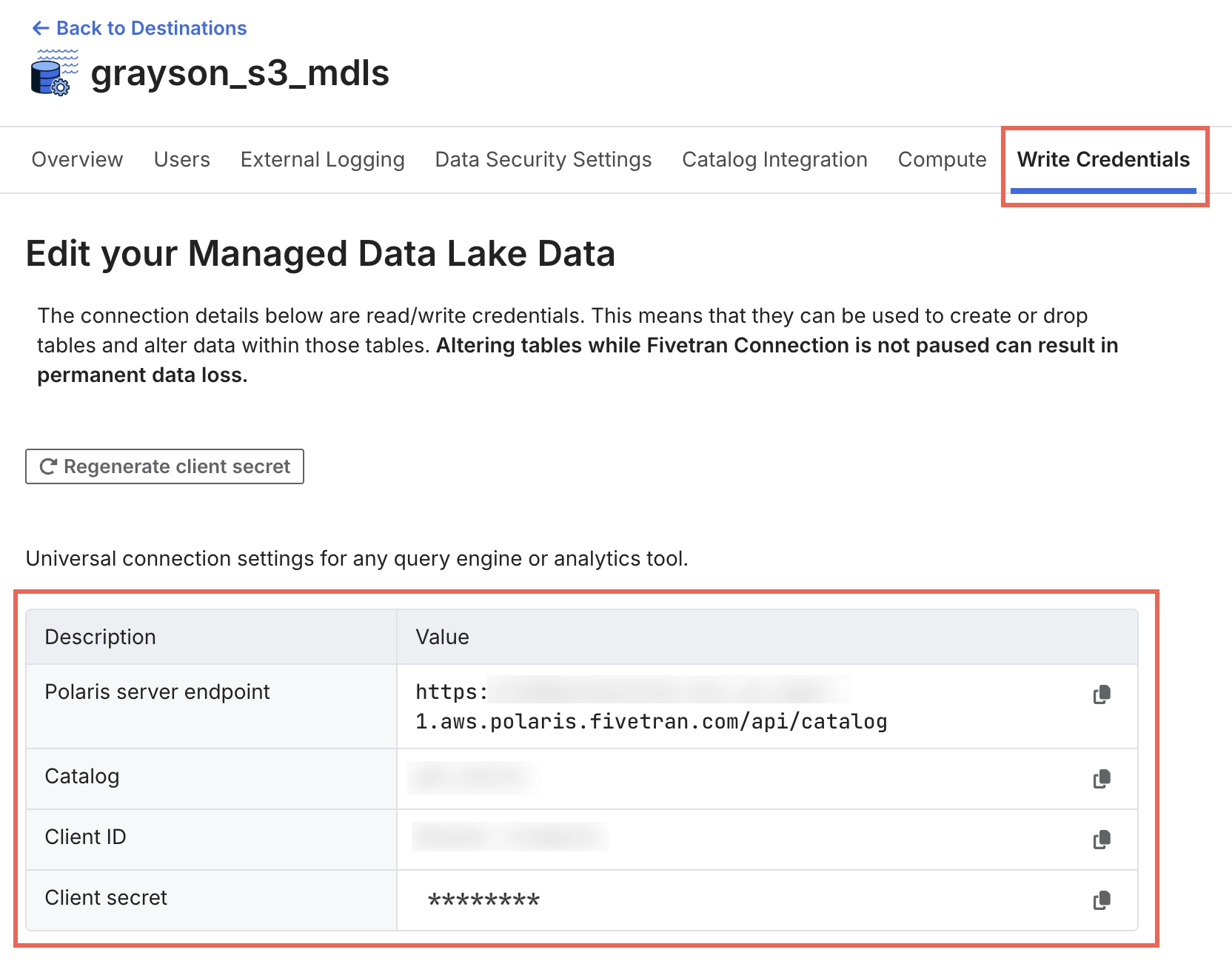
Fivetran masks the Client secret after generating it. If you lose the secret, click Regenerate client secret to invalidate the previous secret and generate a new one.
Connect your engine
Write credentials use the same connection format as read-only credentials.
Follow the instructions for your engine in the Fivetran Catalog Integration Guide. When you configure the connection, replace the read-only Client ID and Client secret with the values from the Write Credentials tab.
The Polaris server endpoint and Catalog values are the same for read-only and write credentials.
Snowflake example
The following image shows where to enter the write credential values in the Snowflake catalog integration SQL. Replace only the OAUTH_CLIENT_ID and OAUTH_CLIENT_SECRET values. Keep all other values from your read-only configuration.
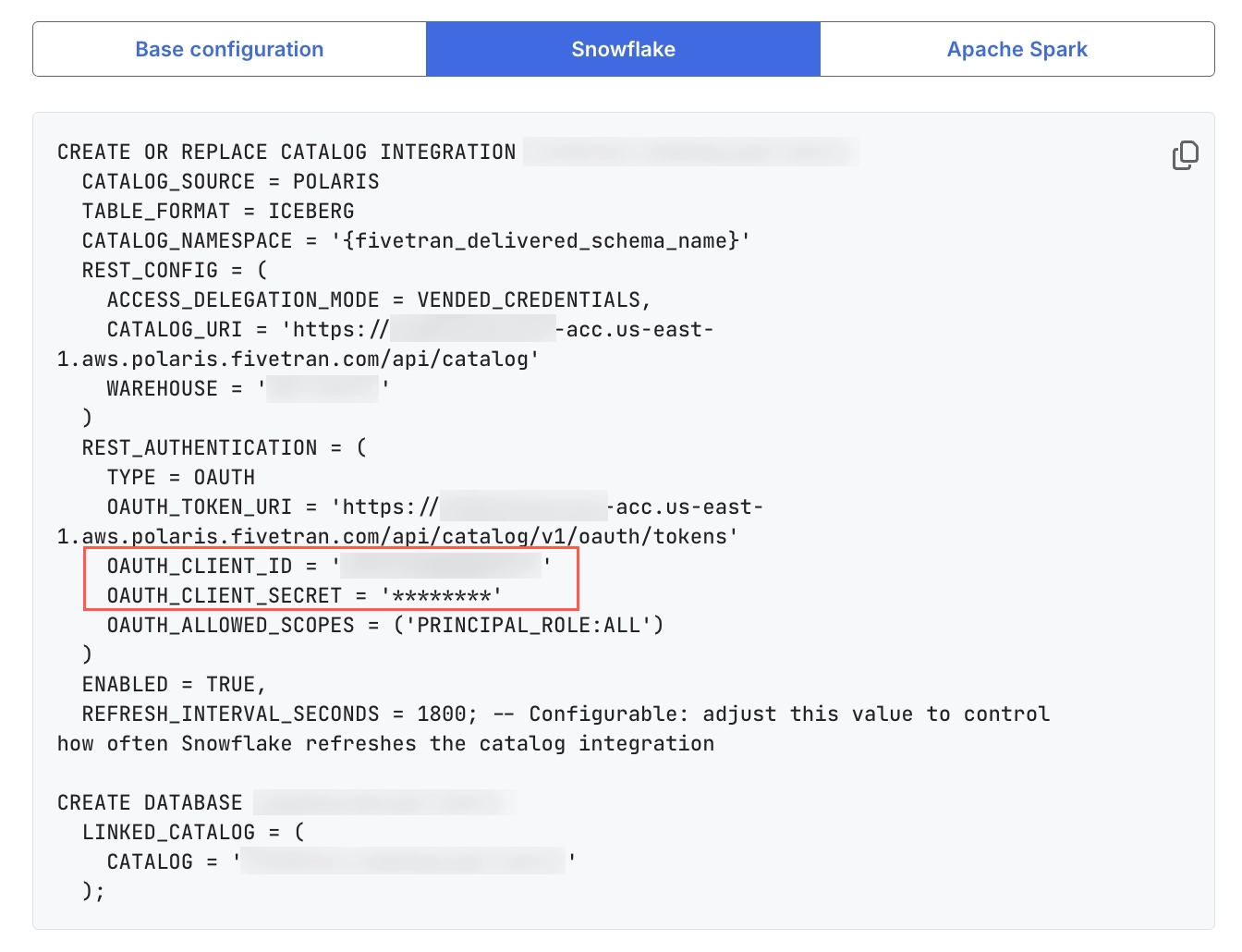
For complete setup instructions, see Query Fivetran-managed tables from Snowflake.
Use write credentials safely
Fivetran-delivered tables contain data replicated from your source systems. During syncs, Fivetran manages and updates the table schemas, data, and metadata.
You can safely create and manage separate schemas and tables for transformations, analytics, and other downstream workloads. However, modifying Fivetran-delivered tables can interfere with subsequent syncs.
Use write credentials carefully. Direct changes to Fivetran-delivered tables can corrupt the tables, cause sync failures, or disrupt downstream workflows.
Pause the relevant connection before modifying a Fivetran-delivered table. If a Fivetran sync and an external write modify the table concurrently, the sync can overwrite your changes or produce unexpected results.
Pause the connection, complete the write operation, and then resume the connection.
External writes to Apache Iceberg™ tables do not immediately update the corresponding Delta Lake metadata. If you enabled Write Delta Format for the destination, Fivetran updates the Delta Lake metadata during the next sync.
Safe operations
You can safely perform the following operations:
- Read Fivetran-delivered tables, including through joins and time-travel queries
- Create your own schemas and tables
- Create tables from Fivetran-delivered data by using operations such as
CREATE TABLE AS SELECT - Perform
INSERT,UPDATE,DELETE, andMERGEoperations on tables that you created
Risky operations on Fivetran-delivered tables
The following operations can affect the integrity or availability of Fivetran-delivered tables. Fivetran may continue syncing after these operations, but the resulting data or table state may not match your expectations.
| CATEGORY | EXAMPLES | POTENTIAL IMPACT |
|---|---|---|
| Schema changes | Adding, dropping, or renaming columns; changing column data types | Fivetran reads the table schema during each sync to determine how to write data. External schema changes can cause sync failures or create differences between the schema that Fivetran expects and the schema that the execution engine uses. |
| Table management | DROP TABLE, RENAME TABLE | If you drop a table, Fivetran may recreate it during a subsequent sync. An incremental sync after table recreation may include only data processed after Fivetran recreates the table and may not restore previously synced historical data. Renaming a table can also cause Fivetran and the execution engine to use different table references. |
| Operations that create positional deletes or deletion vectors | UPDATE, DELETE, or TRUNCATE operations that use merge-on-read behavior | Fivetran writes tables using copy-on-write behavior and does not process positional delete files created through merge-on-read operations. As a result, affected rows may reappear during a subsequent sync. |
| Partitioning changes | Adding or changing a partition specification | Fivetran does not support table partitioning. Fivetran writes unpartitioned tables and does not preserve externally applied partition specifications. A subsequent sync can rewrite the table as unpartitioned data files. |
| Snapshot and maintenance operations | Snapshot rollback, orphan-file cleanup, snapshot expiration | A snapshot rollback can move the table to a state that Fivetran did not create. Fivetran does not automatically reprocess source data that it has already synced, so data removed through a rollback may not return during subsequent syncs. |
| Table property changes | Changing write.data.path, write.format.default, or write.delete.mode | Fivetran does not honor externally configured table properties. Another engine may use these properties to write data in a format or location that Fivetran does not support. For example, an external engine may write ORC files instead of Parquet files, causing a subsequent sync to fail. |
Legal notices
Apache Iceberg is a trademark of the Apache Software Foundation.