
Context Layer Public Preview
Create a unified context layer that AI agents and assistants can use to answer questions about your business accurately.
Overview
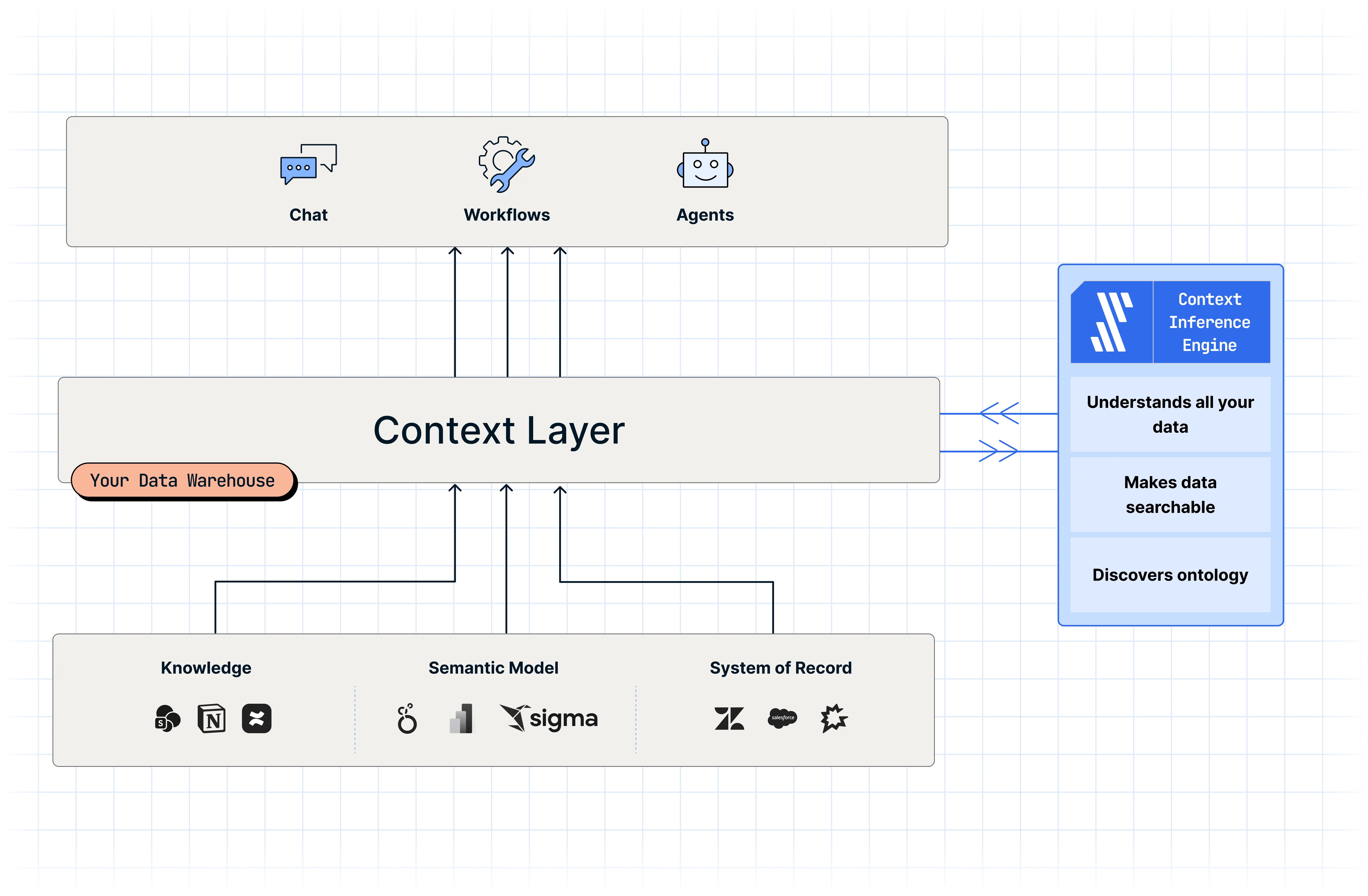
Fivetran Context Layer connects your organization's documentation sources, systems of record, and analytical sources to build a unified context layer in your database, data warehouse, or data lake destination. AI agents and assistants use that context layer to answer questions based on your actual business definitions, operational data, and analytics, rather than guessing from the raw schema alone.
Instead of re-configuring context for each of your AI tools separately, Context Layer allows you to connect multiple tools to a single context layer. Once it's built, explore it in the built-in playground to confirm it responds accurately before connecting it to your organization's AI tools, either directly or using our Agent Context MCP.
How it works
To build a context layer, we perform the following steps:
Select your data: Choose the destination and datasets you want Context Layer to run queries over.
(Optional) Connect your sources: Add your organization's documentation sources (business definitions, policies, and operational records), systems of record (operational facts behind your data), and/or analytical sources (such as Power BI, Sigma Computing, or Hex). While Context Layer does not require connecting to a data source, we recommend connecting at least one of each source type for better answer quality.
Build the context layer: Review your inputs and start the build. Building a context layer typically takes about a day to complete.
Review the organization fingerprint: After the build completes, review the organization fingerprint and the assets connected to your context layer.
Explore in the playground: Test the context layer with sample questions to confirm it responds accurately before rolling it out.
Install in your AI client: Connect the context layer to your organization's AI coding or chat tools. You can either connect through Agent Context MCP or directly using the Agents Schema.
We recommend connecting to the context layer through Agent Context MCP for a simpler setup. You connect all your AI tools to a single interface, rather than configuring direct warehouse access for each one.
For more information, see the Context Layer Setup FAQ.
Agent Context MCP
Agent Context MCP is a governed interface that uses the MCP to expose your context layer to AI tools. Learn more in the Agent Context MCP documentation.
We recommend using Agent Context MCP because it can be more accurate and token-efficient than Agents Schema. Since it stores and pre-processes your business context in Fivetran, Agent Context MCP returns focused answers through structured tools. This method saves tokens by preventing the agent from repeatedly searching the data warehouse and loading large amounts of raw schema information. It can also improve accuracy by giving the agent more relevant context based on your business definitions and metrics.
Agents Schema
Agents Schema is an open-source standard that designates a schema in your destination as the shared context layer for AI agents. It stores metric definitions, semantic models, and business documentation in SQL tables that are published through open-source GitHub Actions. Learn more in the Agents Schema README file.
Fivetran writes connection metadata, searchable table metadata, Context Catalog graph and access-control metadata, and warehouse profile metadata to the AGENTS schema. The following ERD shows the logical join fields that agents can use. It does not indicate warehouse-enforced foreign keys.
FIVETRAN_SEARCH_INDICES describes search artifacts for a table and does not store the artifact rows themselves. PROFILER_* can describe any selected warehouse table, so connector_id is not a foreign key to FIVETRAN_CONNECTIONS.connection_id.
Included services
Context Layer includes the following services, which work together to build an open context layer in your destination:
- Metadata connectors: Ingest metadata and context from semantic layers and data sources.
- Context Catalog: Discover concepts and ontology from metadata sources, wikis, warehouse usage, and more, in a unified view.
- Context Layer-ready data connectors: Prepare your data for use by Context Layer through document parsing, which prepares unstructured data for AI retrieval, and search indexing, which provides search capabilities across applications.
- Agents Schema: A unified view of the context produced by the above services that helps AI navigate all entities in your destination accurately and efficiently.
Prerequisites
Your Fivetran account must meet the following requirements to see and use Context Layer in the Fivetran dashboard:
| Requirement | Details |
|---|---|
| Account plan | Standard, Enterprise, or Business Critical |
| User access | Admin access to your Fivetran account and admin access to the AI coding or chat client you want to integrate with |
Once you start the setup flow, you must also connect a destination that meets the following requirements before you can build your context layer:
| Requirement | Details |
|---|---|
| Destination region | North America |
| Destination cloud | GCP, AWS, or Azure |
| Destination type | Snowflake, BigQuery, or Databricks |
Context Layer is built on the datasets you select in your destination, so connecting data sources is optional. However, we recommend connecting at least one of each of the following source types for better answer quality. We support the following data sources:
| Category | Sources |
|---|---|
| Documentation sources | Confluence, Google Drive, Notion, and SharePoint |
| Analytics sources | dbt Cloud, Hex, Looker, Omni, Power BI, and Sigma Computing |
| Systems of record | Asana, Bitbucket Files, GitHub, GitHub Files, Gong.io, HubSpot, Intercom, Jira, and Zendesk |
Supported plans, clouds, regions, and connectors are subject to change. Contact Fivetran Support to confirm whether your account is eligible.
Usage limits
During Public Preview, Context Layer enforces the following usage limits:
| Limit | Maximum |
|---|---|
| Connections | Up to 50 in total, across documentation sources, systems of record, and analytics sources |
| Agent Context MCP requests | 100,000 per account per day, 1,000 per hour |
These limits are subject to change during the Public Preview period.
Additional support
If you have questions about Context Layer or need help building your context layer, contact Fivetran Support.