
Census Migration FAQ
Find answers to frequently asked questions about migrating from Census to Fivetran.
Don't see your question? Send questions about the migration to activation-support@fivetran.com.
Migration
What changes are coming to Activations?
On October 15, 2026, Fivetran Activations (previously known as Census) launched a new unified product experience with the following improvements:
- Source-based navigation: Manage activations and syncs by source. Previously, activations were organized by individual syncs. The redesigned interface groups syncs by each unique source-to-destination path, similar to how we organize tables within Fivetran connections. You can more easily find individual activations, trial status, and settings.
- Unified access controls: Fivetran Users & Permissions replaces the separate Census access model. The Fivetran access model supports SCIM provisioning, team management, and more granular permissions. Learn more in our Role-Based Access Control documentation.
- Activations API V2: Use the new API version to support source-based management and unified access controls. We will retire Activations API V1 on January 15, 2027. If you use API V1, you must migrate to API V2 before then.
As part of the move to Fivetran Users & Permissions, workspaces are now deprecated. We will retire workspaces on January 15, 2027, along with API V1.
Why are these changes happening?
Census joined Fivetran in 2025, and since then, we've been integrating Census reverse ETL capabilities into the Fivetran platform. The goal is a single, consistent experience: the same access controls, regions, networking, and operational model across all of Fivetran.
Will any features become unavailable?
A small number of features are being retired because equivalent functionality exists elsewhere in Fivetran or is no longer aligned with the product direction. For more information, see the deprecated features section.
Workspaces Deprecated
What's happening to Workspaces?
Workspaces are being retired as a core organizational concept. Most of their functionality is being migrated onto individual activation sources or to the account level. The Fivetran Activations product will evolve to focus on sources rather than workspaces, and new accounts will be created without workspaces at all.
During the migration period from October 15, 2026, to January 15, 2027, some workspace functionality will be available only in API V1 for backward compatibility and won't be present in the UI. After January 15, 2027, workspaces and this workspace functionality will be retired completely.
On October 15, 2026:
- You won't be able to create new workspaces, but your existing workspaces will continue to exist in both the UI and the API. If you must create new workspaces, you can still do so in API V1.
- The workspace switcher starts changing into a source switcher. Creating a new source creates a new entry in the source switcher.
- Workspace settings will be moved to each individual source, including permissions and region. A small number of workspace settings (such as custom destinations) will be moved to the account-wide level.
On January 15, 2027:
- Workspaces will be retired. Any remaining workspaces will be split up by their sources.
- V1 of the API will be retired. You must use V2 of the API from that date forward.
Where do my workspace settings go?
Within the Activations UI, most settings will instead be configured on each source. The current workspace settings page will be accessible from the Activations source list to make the association clear. Specific settings:
- Access controls will move to Fivetran's Users & Permissions page.
- Regions, Datadog, and Extended Alert Recipients will move to source settings.
- Webhooks and workspace API keys will be available only through the API.
I use workspaces to manage access for groups of users. What do I do?
If you're on an Enterprise or Business Critical plan, you can use Fivetran Teams to assign access to groups of users.
Will my existing workspaces be deleted?
All workspaces continue to exist during the transition. You'll see the UI shift to a source-centric view, but your workspaces remain intact. Workspaces that contain a single source today will focus on that source instead. At the end of the transition period, workspaces that had multiple sources will be split up by individual source. Each source keeps the settings and permissions it had while in a workspace.
What happens if I have multiple sources in one workspace?
Your workspace will still appear in the workspace switcher, but the individual sources will receive their own access controls, and you'll manage settings directly on each source rather than at the workspace level.
Can I still create new workspaces with multiple sources through the API?
API V1 supports this today, but this API was deprecated on October 15, 2026, and its existing users should migrate to API V2.
- On December 2, 2026, we'll prevent creation of more than one source within a workspace.
- On January 15, 2027, API V1 will be retired and any remaining multi-source workspaces will be automatically subdivided.
This will be a breaking change for the affected API configurations, so we recommend migrating ahead of the deadline. To avoid IDs changing unexpectedly, we recommend API users proactively request workspace migration when they are ready to handle the ID and API key changes.
Activations
What is an activation?
An activation groups one or more activation syncs between a single activation source and a single activation destination. An activation is the conceptual equivalent to the set of tables in a Fivetran connection. Like connections, you can grant access to individual activations. New activations are eligible for a 14-day free trial, and Monthly Active Rows (MAR) is calculated across all activation syncs within a single activation.
Activations are now the primary way to navigate activation syncs within Fivetran Activations.
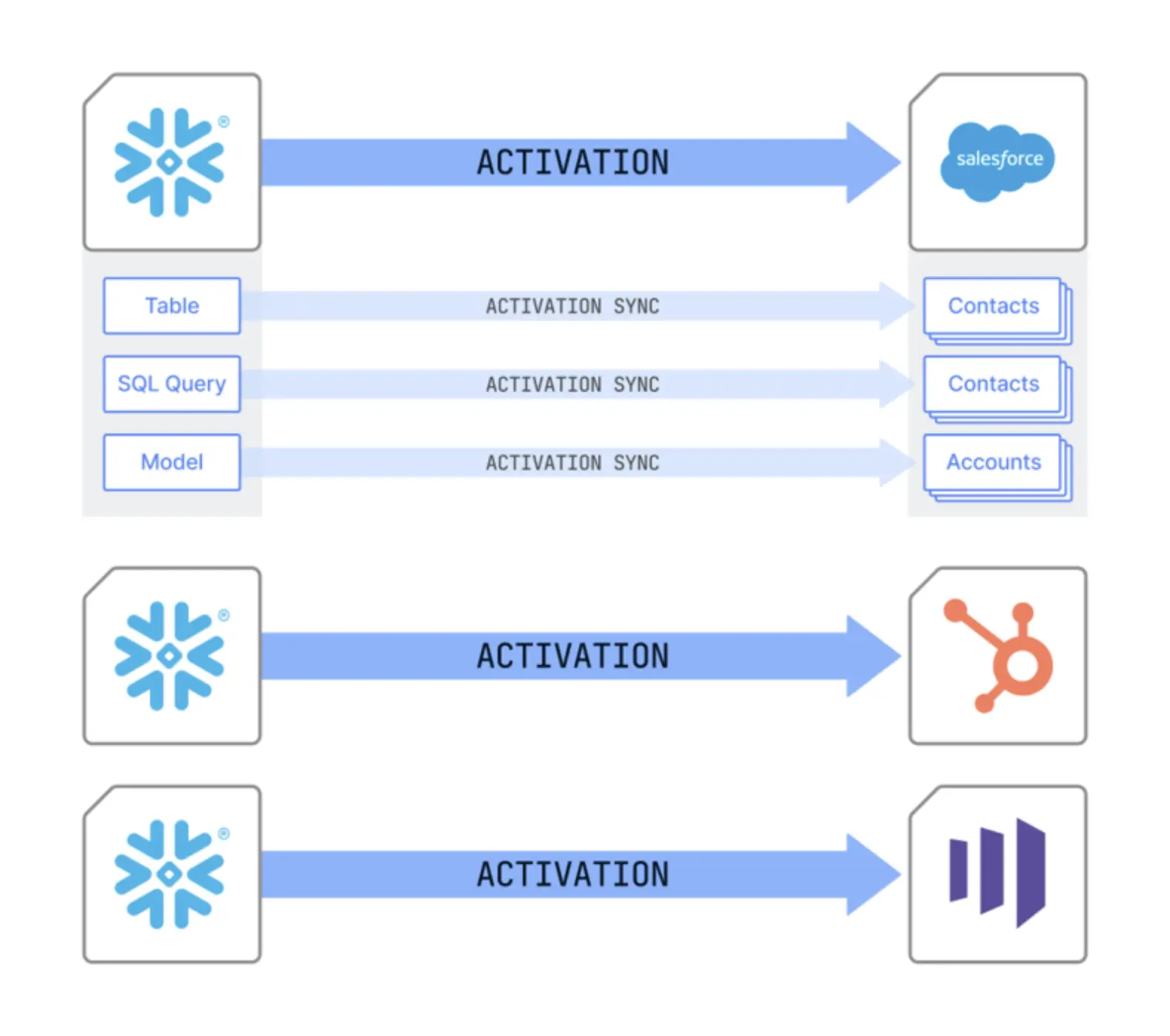
An activation sync is an individual sync that moves data from an activation source to an activation destination (distinct from Fivetran connector destinations). Previously, this was called a "sync" in Census. Multiple activation syncs can write to the same destination.
Where are my activation syncs?
Activation syncs are now grouped with their activation — the pairing of the activation source and activation destination they use. To find a sync, go to the Activations list and open the activation for that source/destination pair to view its syncs.
What happened to folders?
Sync folders have been deprecated. You can no longer create new folders, but any folders you already have will still appear as a filter option on activations, so you can keep using them to find your activation syncs.
Why can't I create an activation destination on its own anymore?
Creating a destination now happens through the Add Activation flow, which creates the destination and its activation together in one step.
I have an activation destination, but it's not showing up as an activation. Where did it go?
All destinations that were previously connected to a source with at least one activation sync now appear as an activation in the Activations list.
However, any destination that was not used in an activation sync will not automatically become an activation. Instead, you can find them by clicking the Source Settings button on the Sources tab, where you can create an activation with that destination.
I used to be able to create Destination Connect Links from the UI. Can I still create Connect Links for Destinations (now Targets)?
Yes, Connect Links are still available and can be generated via the API, but are no longer available in the UI. This is to bring Activations closer inline with the functionality of Fivetran connect cards.
- V2 Connect Links API documentation (Recommended)
- V1 Connect Link API documentation (Only Available until Jan 15 2027)
Activation sources
How are activation sources changing?
Though they’re still separate, activation sources now behave like Fivetran destinations, including acting as a tier of access control. In the future, you'll be able to use existing Fivetran destinations as Activation Sources directly (given the appropriate permissions).
Can I use a Fivetran destination as an activation source?
Not yet, but this is on the roadmap. When available, you'll be able to take advantage of Fivetran's private networking support without configuring a separate connection.
Access controls and permissions
How are access controls changing?
Activations permissions will be managed by Fivetran's existing access controls. You'll manage access to activation sources using Fivetran's standard roles and teams, the same way you manage Fivetran destinations.
What new capabilities does this bring?
SCIM provisioning, team management, and finer-grained permissions, including the ability to grant access per activation destination.
Why do activation sources use the destination permission?
In Fivetran, the Destinations permission manages connections to warehouses and data lakes. The same permission manages activation sources. We know this overlap is confusing, and we plan to rename destinations to something more intuitive in the near future.
What happens during the transition?
For most accounts, your existing permissions are moved automatically into Fivetran with no action required on your part. Your existing permissions are respected, though roles lose some access during this transition:
- Legacy Owner roles lose the ability to create new activation sources. They need to be granted an account-level role with permissions to create new destinations, such as the Destination Creator role.
- Legacy Editor roles lose the ability to invite and manage members and to test warehouse connections. They need the Manage Destination role instead.
- Legacy Operator roles also lose the ability to test warehouse connections.
How do legacy Census roles map to Fivetran roles?
The following matrix compares what each Fivetran role can do with what each legacy Census workspace role could do. These permissions apply to specific activation sources.
| Action | Create Connection | View Destination | Manage Connection | Edit Destination | Manage Destination | Legacy Viewer | Legacy Operator | Legacy Editor | Legacy Owner |
|---|---|---|---|---|---|---|---|---|---|
| Activation Sources | |||||||||
| View Activation Sources | |||||||||
| Test Activation Sources | |||||||||
| Create and manage Activation Sources | Account role: Account Admin or Destination Creator | ||||||||
| Create and manage dbt or Looker Connections | |||||||||
| Create and manage workspace-level dbt Cloud Integrations | Account Administrator | ||||||||
| Manage Member Roles | |||||||||
| Remove Members from Workspaces | |||||||||
| Create, manage, and delete Workspaces | |||||||||
| Activation Target Connections | |||||||||
| View Activation Target Connections | |||||||||
| Create Activation Target Connections | |||||||||
| Manage Activation Target Connections | |||||||||
| Segment | |||||||||
| Create and edit Segments | |||||||||
| Create and modify Exclusion Lists | |||||||||
| Dataset | |||||||||
| Preview Sample for Datasets | |||||||||
| Create and edit Datasets | |||||||||
| Activations | |||||||||
| Create custom objects, audiences, and tables in destination | |||||||||
| View Syncs | |||||||||
| View Activation | |||||||||
| Create Activation | |||||||||
| Delete Activation | |||||||||
| Create, edit, and run Syncs on segments and datasets | |||||||||
| Create, edit, and run Syncs on datasets, tables, and views |
I have Census custom roles. What happens to them?
For Enterprise customers using Census custom roles, our support team works with you one-on-one to translate them into Fivetran custom roles that preserve your intended access.
I'm programmatically managing access controls through the API. What does the transition look like for me?
Workspace-based access controls and tokens remain available in the API through January 15, 2027.
Will Census Embedded customers still be able to support multi-tenant use cases?
Yes. Multi-tenant use cases are supported through the source-based access control model, matching the approach used for Powered by Fivetran.
API
What's changing in the API?
On October 15, 2026, we released V2 of the Activations API. For more information, see the Activations REST API V2 documentation. At a high level, this API is very similar to V1. The main changes are as follows:
- Workspaces are no longer present in the API.
- Instead, the API focuses on activations and now supports Fivetran group IDs for consistent access control management.
For a step-by-step walkthrough with examples, see Migrate from API V1 to V2. To migrate, make the following changes:
- Stop using workspace API keys. Instead, switch to Activations personal access tokens (PATs), which are separate from Fivetran PATs.
- If you're programmatically managing user permissions, start using Fivetran's existing user and access management APIs. This requires a separate, additional Fivetran API key.
How long do I have to migrate?
API V1 will continue to work during the transition period from October 15, 2026, until January 15, 2027, at which point the API V1 endpoints will be retired.
Which API endpoints are being deprecated?
Workspace, workspace token, and workspace permission endpoints are being deprecated. User and access control management is moving to Fivetran's APIs.
The Activations API V1 retirement date is January 15, 2027. We haven't yet announced a retirement date for api.getcensus.com. We do plan to integrate our APIs further in the future, and we'll communicate those changes and their timeline when they're finalized.
Will activation destination APIs change?
Yes. Activation destination APIs will take a Fivetran group ID instead of a workspace ID.
Will workspace API keys be removed entirely?
Workspace API keys will remain part of API V1 for backward compatibility while API V1 is available. Admins will use their PAT to access workspace keys for access to legacy parts of the API.
What about sync triggers in the UI?
Sync triggers in the UI currently use workspace API keys. As workspace API keys move to API-only, the UI's sync triggers will be updated to use PATs instead.
I use the Terraform provider. What do I need to do?
No changes are needed other than planning to update to the latest version. The Activations Terraform provider already uses the Activations PAT. Terraform is also our recommended path for customers previously using workspace cloning, templates, or variables to manage multi-tenant configurations.
I use the Airflow or Prefect integrations. What do I need to do?
You must upgrade to the latest version of the integration and switch to PATs.
Regions, cloud, and networking
Which regions and clouds will be supported?
Activations is moving to the Fivetran clouds and regions. Region settings have moved from organization/workspace onto individual activation sources. Every new activation source can now choose its own geography, cloud, and region according to your Fivetran pricing plan.
What does that mean for my old connections?
The Fivetran infrastructure team will be migrating customer accounts and activation sources from legacy Census infrastructure to Fivetran infrastructure automatically starting in October 2026. For the majority of customers, no action is required and your activation sources will move, in accordance with your plan. We migrate your existing Activations configuration and validate affected connections before moving them.
To minimize disruption, some customers will be grandfathered into AWS cloud regions that they won't be able to use with new activation sources. If this affects you, contact support to standardize all of your existing sources on a single cloud region that's compatible with your Fivetran plan.
Some customers will need to take action. Once migrated, activations will begin reaching out from Fivetran's IP addresses and, in some cases, from a different cloud identity or cloud environment. You may need to make a change if you use any of the following:
- Static IP allowlists
- Customer-owned storage (BYOB)
- Snowflake storage integrations
- BigQuery or Redshift sources outside their native cloud
- AWS PrivateLink
We send organization administrators two types of emails about the migration:
- Action-required email: Sent before your scheduled migration window, only if your team needs to make a change. It's the source of truth for your affected connections, target region, required changes, and any applicable deadline.
- Migration completion email: Sent to every organization once its migration is complete, including organizations that didn't need to take action.
When will my organization migrate?
Migrations happen in phases. If your team needs to take action, you'll receive an action-required email at least 30 days before your scheduled migration window. Otherwise, we migrate your organization automatically during its assigned window and send a migration completion email once it's done. You can also find your organization's cloud region in Organization Settings.
Will my geographic data location change?
No. We keep your workload in the same geographic location. If a change of cloud has a contractual or plan implication, we review it with you as part of the migration.
Could my syncs be delayed during migration?
We don't expect any delays or issues, but we monitor closely as we move customers to the new infrastructure. If you notice an issue after receiving your migration completion email, create a support ticket in the Fivetran support portal and we'll investigate.
How can I check if an activation source is ready to migrate?
If your organization is on legacy Census infrastructure, each activation source shows a Migration helper panel. It runs a connection test from the source's target region, for example gcp-us-east4, so you can confirm that the source will keep working after the migration. Any user who can test a source can run the check. We also test connections ahead of your migration, so a result may appear before you receive any email from us.
The panel shows one of two results:
- This connection is ready: We connected to the source from its target region. No action is needed, and we record the result automatically.
- This connection needs your attention before we can move it: We couldn't connect to the source from its target region, and the panel shows the error we received. Your syncs keep running as normal, and we don't migrate this source until the check passes.
If your source needs attention:
- Read the error shown in the panel.
- Fix the cause. The most common causes are IP allowlists, customer-owned storage, and Snowflake storage integrations. A failure can also come from credentials, a network policy, or PrivateLink.
- Click Check again in the panel to re-run the test.
If the check still fails and you can't tell why, contact Fivetran Support with your organization name, the source name, and the error shown in the panel.
The Migration helper checks activation sources only. We validate activation destinations separately and contact you if one needs a change.
What are Fivetran Activations' new IP addresses?
If you use a legacy region, you must grant access to both the legacy and upcoming IP addresses to avoid disruption during migration. Keep your legacy IP addresses in place until you receive your migration completion email.
| Region | Legacy IP Addresses (CIDR) | Upcoming IP Addresses (CIDR) | Upcoming IP Addresses (Range) |
|---|---|---|---|
| 🇺🇸 N. Virginia (us-east-1) | 3.220.140.57 54.81.195.173 | 3.239.194.48/29 | 3.239.194.48 - 3.239.194.55 |
| 🇪🇺 Frankfurt (eu-central-1) | 3.73.223.175 18.195.84.64 3.74.27.151 | 3.67.81.32/29 | 3.67.81.32 - 3.67.81.39 |
| 🇦🇺 Sydney (ap-southeast-2) | 52.64.222.172 52.62.68.139 | 3.26.88.224/29 | 3.26.88.224 - 3.26.88.231 |
All other regions use Fivetran's Standard IP addresses. The Migration helper shows each source's target region code.
Where do I need to add the new IP addresses?
Add the new IP addresses to every control that restricts inbound traffic from Activations for the affected connection. Depending on your setup, this can include:
- A database or data warehouse network policy
- A firewall or proxy allowlist
- A cloud security group or network access control list
- A SaaS or destination IP allowlist
Why did Fivetran contact me if my connection works today?
A connection that works from legacy Census infrastructure can behave differently when tested from the target Fivetran environment. An existing rule may allow only legacy traffic, or the connection may have another dependency on the target environment that needs review.
A failed test doesn't necessarily mean that IP allowlisting is the cause. It can also indicate a credentials, network policy, storage, PrivateLink, or connection-specific configuration issue. Follow the instructions in your action-required email. For an activation source, you can re-run the same test yourself with the Migration helper.
Are the AWS and GCP account IDs changing?
Yes. Activations is moving to Fivetran's AWS and GCP account IDs. Existing GCP service account IDs remain the same. Only new GCP service account IDs have a new format.
You must update any IAM configuration for AWS sources and destinations that uses the old Census account ID 341876425553 to also include Fivetran's account ID 834469178297 to ensure a smooth transition. For example, extend the Principal section inside an AssumeRolePolicyDocument to include both account IDs:
...
"Principal": {
  "AWS": [
    "arn:aws:iam::341876425553:root",
    "arn:aws:iam::834469178297:root"
  ]
},...
I use customer-owned storage (BYOB). What do I need to change?
If your connection uses a customer-managed storage location instead of Fivetran-managed staging storage, the target Fivetran environment must be authorized to access that location before migration. Depending on your storage provider and configuration, you may need to update the bucket IAM permissions or trusted cloud identities. Your action-required email includes the exact target identity and configuration for your connection. You don't need to move or copy any data.
After you make the change, click Check again in the Migration helper on the affected source. Its test includes your customer-owned storage, and a passing check is recorded automatically. Otherwise, confirm completion through the channel in your action-required email.
I use a Snowflake storage integration. What do I need to change?
A Snowflake storage integration can be tied to the identity or storage configuration used by legacy Census infrastructure, so it may need to be updated or re-authorized before the source can run from its target Fivetran environment. If so, your action-required email includes the affected connection, the target cloud or region, and the identity or configuration you need to authorize.
After you update the integration, click Check again in the Migration helper on the affected Snowflake source. A passing check is recorded automatically. Otherwise, confirm completion through the channel in your action-required email.
I use BigQuery, Redshift, or both. Will I need to choose a cloud?
Possibly. Some activation sources have cloud-specific staging requirements:
- BigQuery: Requires a GCP target environment, or a custom-configured bucket if running elsewhere.
- Redshift: Requires an AWS target environment, or a custom-configured bucket if running elsewhere.
If your organization's default cloud and a source's requirements point to different clouds, we may ask you to choose one. Cloud choice is available only for certain organizations and configurations, and your action-required email explains your options and their implications. If you use sources across multiple clouds, a single cloud may not fit all of your connections, so we work with you on a connection-specific migration plan.
I use AWS PrivateLink. What do I need to do?
PrivateLink endpoints are regional and don't automatically move with a connection. Fivetran Support works with you directly to establish or port the private connection in the target region and complete any required acceptance steps.
What if I have another networking or connection dependency that's not listed here?
Reply to your action-required email or contact Fivetran Support with your organization name and the affected connection. We'll review the configuration and provide next steps.
Deprecated features
Two Census Embedded/Powered by Fivetran features are now deprecated. This means that although they're still available in API V1, you shouldn't use them for new deployments, and you should begin migrating existing deployments. These features will be retired on January 15, 2027.
- Workspace cloning, templates, and variables: These features were primarily used to support multi-tenancy for Census Embedded and Powered by Fivetran customers. We recommend using Terraform to manage these configurations instead.
- Source Connect Links: This feature let users outside an authenticated session create activation sources. If you use this feature, use the API directly to create new sources instead.
Legacy Census pricing
How is Census priced moving forward?
If you're on a paid annual Census plan, you can continue using Census within Fivetran until your current Census plan ends. You can see the end date of your plan during migration and on the Activations settings legacy billing page. All month-to-month Census plans ended in March 2026.
Once your legacy Census plan ends, your account moves to Fivetran's usage-based pricing model, which tracks usage in monthly active rows (MAR). Like Census, you can pay for Fivetran on an annual contract or a monthly pay-as-you-go model.
Here's what to expect based on your situation:
- I have a Census plan but I'm new to Fivetran: Your Census plan continues to cover your use of Census features inside Fivetran until your contract ends. During this period, you need to select the Fivetran paid or free plan you'll use after your Census plan expires. This plan includes both Fivetran features and your migrated Census features. If you don't choose a plan before your Census plan expires, your account may be frozen until you select a plan. You can change your Fivetran plan at any time.
- I have a Census plan and a Fivetran account and plan: You'll continue to pay for Census and Fivetran separately until your Census contract ends. Once your Census contract ends, your Census usage applies to your Fivetran plan. You can change your pricing plan at any time.
Where can I find my legacy Census plan information?
If your account is still on a legacy Census plan, you'll continue to see usage information related to your plan in the Billing section of the Settings page in Activations, under Organization Settings.
Once your plan ends and migrates to consumption-based pricing, this report is no longer accessible. Instead, use Fivetran's overall Usage and Billing page, located at the bottom of the navigation menu.
Where can I estimate my updated pricing?
You can estimate your Activations pricing using Fivetran's Pricing Estimator, as you can for Connections and Transformations.
What are Fivetran's different plan options?
Learn more about Fivetran's pricing plans and what they cost in our service consumption table.
The Fivetran plan depends on your existing Census plan and which features you're using. During the migration, if you're unsure or need more time to configure payment mechanisms, you can select the Fivetran Free plan to start. You can change your pricing plan at any time.
Which Census features are available in which Fivetran plan?
In most cases, each Census plan has an equivalent Fivetran plan that contains the same features.
| Census Plan | Equivalent Fivetran Plan |
|---|---|
| Free | Free |
| Professional | Standard |
| Enterprise & Enterprise Lite | Enterprise |
There's a small set of exceptions:
- PrivateLink is available only in Fivetran's Business Critical plan.
- The list of Enterprise connectors has changed to match Fivetran's.
- Access controls are available on all plans. Custom roles remain an Enterprise plan-only feature.
- Activations in Powered by Fivetran (formerly Census Embedded) are available on all plans.
What is MAR?
MAR is the number of unique rows of data synced from your activation source to your activation destination in a month. For Activations, we determine unique rows by using the sync key or matching key specified in each activation sync. Each row is counted only once, even if it's updated multiple times in the same month. Learn more in our Monthly Active Rows documentation.
Will I save money if I move from a monthly to an annual contract?
Yes, you unlock discounts when you switch to an annual contract. We calculate your discount based on the total annual list price of your contract and the plan you choose. Learn more in our Discounts with annual contracts documentation.
What's happening with Census Embedded?
We continue to support Census Embedded use cases through Activations in Powered by Fivetran.