
fivetran-connector-sdk-core
fivetran-connector-sdk-core is the package that runs your connector on your own compute when you use fivetran debug or fivetran run. It receives what your connector emits, such as upserts, deletes, checkpoints, and schema declarations, applies the same rules Fivetran applies in production, and writes the result to a local DuckDB file or to an Apache Iceberg catalog.
You do not need to install the core separately. It gets installed automatically as a dependency of fivetran-connector-sdk.
The core has its own terms of service, separate from the Connector SDK: Fivetran Connector SDK Core License Agreement.
Local core versus deployed execution
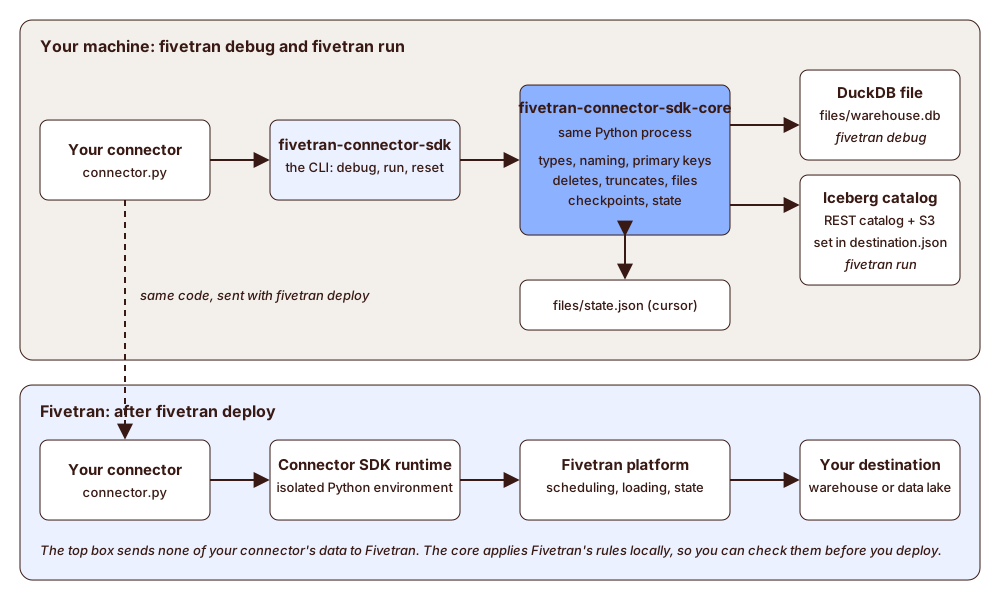
The diagram shows two ways to run the same connector.py:
- On your compute (top). The
fivetran-connector-sdkCLI loads your connector and starts it in the current Python process. The core runs in that same process. It applies the rules for types, naming, primary keys, deletes, truncates, and checkpoints, and writes the data. Your connector's data is not sent to Fivetran.fivetran debugwrites to the DuckDB filefiles/warehouse.db.fivetran runwrites to the Iceberg REST catalog that you describe indestination.json.- Both keep your cursor in
files/state.json.
- On Fivetran (bottom). After
fivetran deploy, the Connector SDK runtime runs your code, and the Fivetran platform loads the data into your destination. The core is not part of this path.
The following table compares the execution environment, data destination, configuration, and state management for each method.
fivetran debug | fivetran run | Deployed connection | |
|---|---|---|---|
| Where your code runs | Your machine | Your machine | Fivetran |
| Where the data goes | files/warehouse.db (DuckDB) | Your Iceberg catalog | Your Fivetran destination |
| Uses the core | Yes | Yes | No |
| Configuration | configuration.json | configuration.json and destination.json | configuration.json |
| Where the state is kept | files/state.json | files/state.json | Fivetran |
What the core does
The core applies the rules that decide what your tables look like, so that a local run shows what a sync produces:
- Types: Values are checked against the declared or inferred column type, and compatible values are converted. See supported data types.
- Naming: Schema, table, and column names follow the naming strategy you choose with
--naming. - System columns: Every table gets the
_fivetran_syncedsystem column. A table that receives upserts also gets_fivetran_deleted. A table that is only declared and has no rows yet has_fivetran_syncedalone. - Primary keys: Rows are merged on the full primary key. A null key column stops the run with an error that names the table. A table with no primary key gets an
_fivetran_idcolumn, a hash of the row's columns, which is used as its key. A primary key change rewrites the table if its rows fit the new key, and the run fails if they don't. - Deletes and truncates:
delete()andtruncate()set_fivetran_deletedtotrue. They do not remove rows. - Schema changes: A new column is added, and a column whose type has to change is converted.
- Checkpoints and state: Each checkpoint commits the rows emitted since the last one and saves the state.
Install and version
The core is installed automatically with fivetran-connector-sdk as a dependency.
When something goes wrong
Errors name the table, column, or setting that is wrong, and what to do. For fivetran run, they include:
- A wrong sign-in, warehouse, or storage setting, which names the setting in
destination.jsonto fix. - A table whose metadata the catalog cannot read, which says the table is damaged.
- A table that was renamed in the catalog, which says that its folder is still used by the renamed table, and asks you to rename it back or drop it.
For the settings of destination.json and the errors for a file that is not valid, see Write to an Iceberg catalog.