
State Management
This page covers what state management is and how to implement it in your Connector SDK connector.
State management lets your connector record and recall progress, making it possible for a sync to pick up where the last one left off instead of re-syncing everything. Well-implemented state makes connectors incremental, maintainable, and scalable.
Understanding state
State is a JSON dictionary that you define and send to Fivetran at specific points during your sync. The Connector SDK runtime provides your connector with the last saved state at the start of each sync. Your code can then use that state to pick up where the previous sync left off and avoid reprocessing data.
State can store any JSON-serializable value, such as timestamps or IDs. Python built-in types such as strings, numbers, lists, and dictionaries are also supported.
Example state.json
state = {
    "last_updated_at": "2024-01-01T00:00:00Z",
    "last_id": "12345"
}
Key concepts: cursor and checkpoint
These two concepts are fundamental to understanding state management.
Cursor
A cursor is a key-value pair in the state dictionary that tracks how far the connector has progressed through the source data. The key names what is being tracked (for example, last_updated_at or last_id) and the value links back to the specific record, page, or position in the source where the connector should resume next.
If your source is large or changes frequently, re-fetching all records on every sync is impractical. A cursor lets your connector skip records it has already processed and fetch only what is new or updated. If your source is small and rarely changes, a full sync each run may be simpler and sufficient.
Different sources manage iteration and batch retrieval in different ways, which is why cursors can take many shapes. The type of cursor you use depends on what your source exposes.
A cursor can be a:
- Timestamp, such as
last_updated_at = "2025-01-01T00:00:00Z" - Monotonically increasing ID, such as
last_id = "12345" - Page number or offset, such as
page = 3oroffset = 60 - Next-page token, such as
next_page_token = "abc123token"
You can also use a compound cursor that combines multiple values. Use this when a single value is not enough, for example, when multiple records share the same timestamp, store both the timestamp and an ID to identify exactly where to resume: { "updated_at": "2025-01-01T00:00:00Z", "last_id": "12345" }.
Checkpoint
A checkpoint is the act of persisting progress. It serves two purposes. First, it tells Fivetran that the data sent so far can be safely written to your destination. Second, it sends updated state to Fivetran for persisting sync progress. When your connector calls the checkpoint operation, Fivetran replaces the currently stored state dictionary with the updated state dictionary sent in the call. At the start of each new sync, Fivetran provides the last saved state to update(), whether the previous sync completed successfully or ended with an error.
Fivetran writes data between checkpoints atomically: either all of it reaches your destination, or none of it does.
How often should you checkpoint?
Checkpointing is a balance between data integrity and performance: the more frequently you checkpoint, the less data your connector needs to reprocess after a failure, but each checkpoint call uses resources and can slow down your sync.
Checkpoint after completing a batch of data that your connector can safely resume from, such as an API page, file, or source partition. Send all records for that batch to Fivetran using the upsert or update operation, then advance the cursor and checkpoint.
Choose batches small enough that reprocessing them after a failure is acceptable. If a batch takes a long time to reprocess, divide it into smaller batches. If frequent checkpointing slows the sync, combine adjacent batches and checkpoint at the end, while keeping the cursor state accurate.
If a sync fails, Fivetran provides your connector with the state saved at the last checkpoint. Any data processed after that checkpoint may not be written to your destination.
Even if your connector doesn't need state, we strongly recommend calling the checkpoint operation in your Connector SDK code. It tells Fivetran that this batch is complete and safe to deliver.
Important considerations when designing state
- Consider on a per-table or per-use-case basis whether you need to persist state and take advantage of incremental syncs. Some tables or use cases, such as one-time CSV loads, may not require incremental sync, and therefore require no explicit state management.
- Before committing to an incremental sync strategy, check whether your source supports capturing deletes. Many sources, particularly some REST APIs, don't expose deleted records incrementally — the only way to capture them is a full re-sync on every sync. If your use case requires deletes and your source doesn't support them incrementally, a full refresh strategy may be your only option.
- Plan which cursors to use and choose key names you can maintain across releases.
- REST API endpoints: Use whatever the API exposes for filtering, typically
updated_attimestamps or ordered numeric IDs (for example,after_id=12345). - Databases: Prefer auto-incrementing integer primary keys — each value is unique per row, so one field is enough to resume exactly. Avoid timestamps alone, since multiple rows can share the same value and you cannot tell which ones you already processed. If timestamps are your only option, store both the timestamp and the primary key together, for example
{ "updated_at": "...", "id": "..." }. - CDC or log-based sync: Store the log position as the cursor, for example
{ "lsn": "...", "xid": "..." }in PostgreSQL. Complete a full historical sync first since CDC only captures changes going forward.
- REST API endpoints: Use whatever the API exposes for filtering, typically
- The state object has a size limit of 10 MB. Avoid storing every processed UUID, which causes state to grow without bounds.
- If you have to rename state keys across releases, update your code to look for the new name. If you don't, your connector treats the key as missing on the next sync, falls back to a default value if one is set, and may silently trigger a full re-sync.
- Never store sensitive information in state, such as API tokens or passwords, encryption keys, or personally identifiable information (PII). Use the configuration JSON file for sensitive parameters. To know how to update configuration during a sync, for example, to refresh an authentication token, see the Update configuration during sync example.
Additional guidance for incremental sync state
State key conventions
- Use descriptive key names that reflect what they track: for example,
users_last_syncrather thancursor1. - In multi-table connectors, include the table name as part of the key so cursors are independently scoped.
- When making breaking changes to your state structure, version the keys (for example,
orders_cursor_v2) so your connector can read both old and new formats during the transition.
State migration
When you change your state schema across connector releases, your connector must handle both old and new key formats in the same update() function. Failing to do this causes the connector to treat the missing new key as a first run and silently trigger a full re-sync.
Defensive state reads
Validate the structure of what you read from state before using it. Do not assume state matches the shape your current connector version writes, especially after a deployment that changes the schema.
Serialization
Keep state values small and efficiently serialized. Prefer primitive types (strings, integers) over complex objects. If you need to store structured data, keep nesting shallow.
Implementing state
Once you have defined your state structure, implement the following pattern inside your Connector SDK code:
- At the start of each sync, read cursors from the state dictionary passed into
update(). On the first run, state is an empty dictionary ({}), so your code should provide good default values.It's common to fully process data associated with one cursor and then move to the next.
- Retrieve the next batch of data for a cursor starting at the cursor value, process it, and send it to Fivetran using the upsert or update operation.
- Advance the cursor value so the new state reflects the most recently processed data.
- Call
op.checkpoint(state=new_state)to persist progress. Fivetran saves the state and writes all received data to your destination. - Repeat from step 2 until all available data for that cursor has been processed, then move to the next cursor. When all cursors are fully processed, return from
update().
On the next sync, Fivetran passes the new state back to update(), allowing your connector to pick up where it left off.
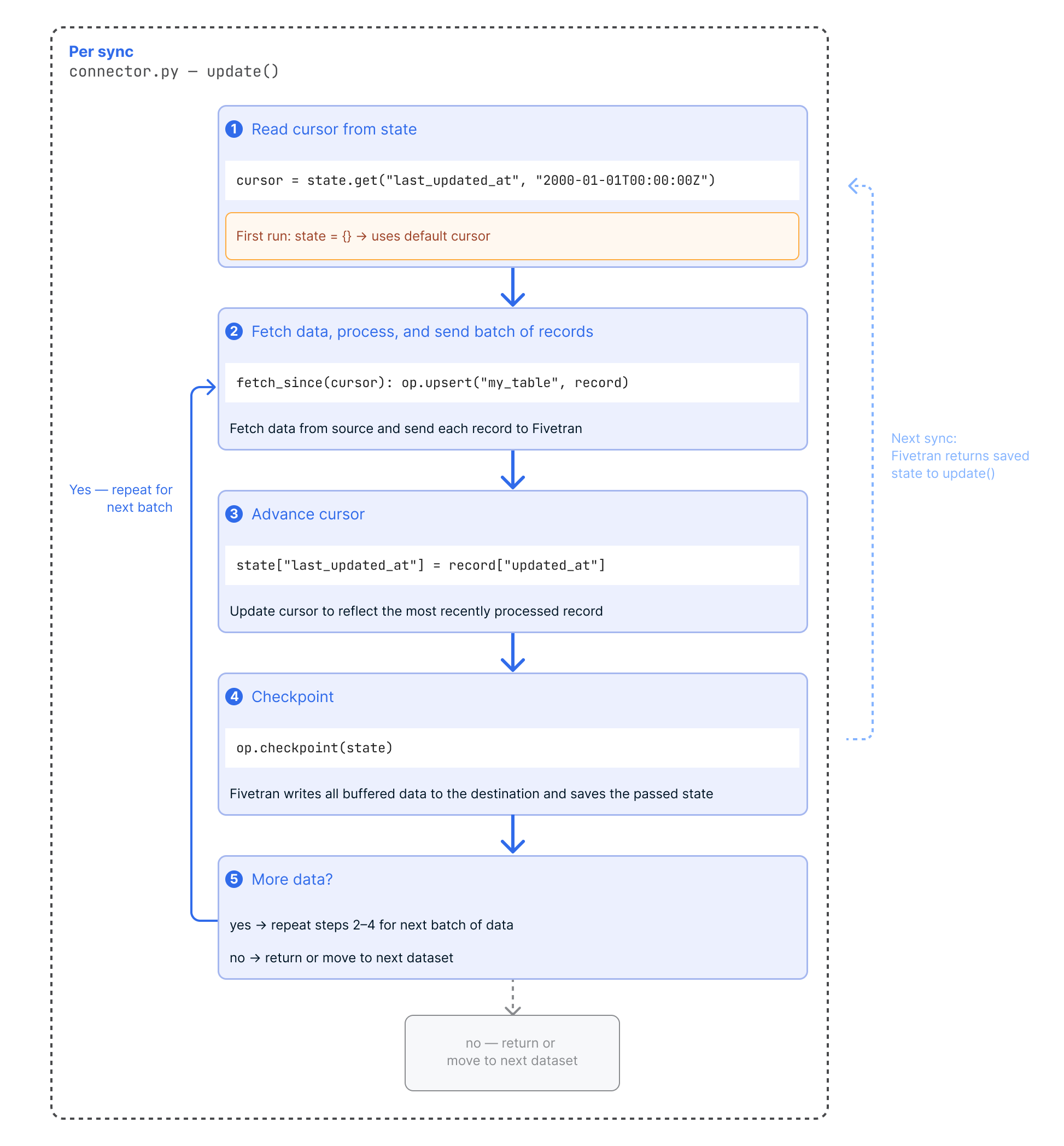
Updating the state dictionary alone does not persist it. You must call the checkpoint operation to send the new state to Fivetran for saving.
Basic state implementation example
The following example uses a timestamp cursor to sync only new or updated records. The cursor advances after each record and checkpoints after each page.
def update(configuration: dict, state: dict):
    cursor = state.get("last_updated_at", "2000-01-01T00:00:00Z")  # default to epoch date on first run

    for page in fetch_pages_since(cursor):
        for record in page:
            op.upsert(table="my_table", data=record)
            state["last_updated_at"] = record["updated_at"]  # advance cursor per record

        op.checkpoint(state)  # persist after each full page
Multi-table state implementation example
This example shows how to manage independent cursors for multiple tables in the update() function. Each table syncs from its own last-processed timestamp, and the state checkpoints after each table completes.
def update(configuration: dict, state: dict):
    # Initialize state for multiple tables each with a timestamp cursor eg from an updated_at column
    current_cursors = {
        # Use a past date as the default, or set to your API's earliest supported date
        'users': state.get('users', '2000-01-01T00:00:00Z'),
        'orders': state.get('orders', '2000-01-01T00:00:00Z')
    }

    # Process each table
    for table_name, cursor in current_cursors.items():
        latest_cursor = cursor
        for record in fetch_table_data_since(table_name, cursor):
            op.upsert(table=table_name, data=record)
            latest_cursor = record.get('updated_at')

        # Update cursor for this table
        current_cursors[table_name] = latest_cursor

        # Checkpoint after each table completes sending updated state dictionary to Fivetran.
        op.checkpoint(state=current_cursors)
Connectors written for Fivetran Connector SDK versions earlier than 2.0.0 use yield op.upsert(...) and yield op.checkpoint(...). Both styles work, but the yield keyword is no longer required. If you encounter it in existing code, see Removing yield usage.
State management in more complex connectors
As connectors grow beyond simple use cases, state management often becomes more nuanced. API connectors in particular tend to expose multiple entities and endpoints, each with different sync characteristics that require independent cursors managed separately. Additionally, connectors may need to support historical resyncs for specific data or evolving schemas.
The following concepts extend the fundamentals without changing them.
Replication mode per table or endpoint
Every object you sync fits into one of two main replication modes:
- Full resync every sync: Re-fetch all data on every sync. No explicit state management is needed because there is no incremental progress to track.
- Historical sync followed by incremental syncs (most common): Perform a full historical sync on the first run, then maintain a cursor to track incremental progress on subsequent syncs. The cursor can be an updated timestamp, a monotonically increasing ID, a page token, or similar.
You can mix these modes within the same connector as long as you correctly manage historical syncs and keep the span of data associated with a cursor clearly defined.
Multiple API endpoints in one connector
If your connector syncs data from multiple endpoints, we recommend isolating progress for each one.
- The simplest approach is to create a separate Fivetran connection per endpoint which you redeploy independently with its own state. This is often useful for prototyping and testing, though it is more expensive to run.
- Alternatively, store separate cursors under named keys in the state dictionary.
For parent-child relationships where each parent has its own child cursor, use a nested dictionary keyed by a descriptive parent ID:
{
  "company_cursor": "2024-08-14T01:00:00Z",
  "department_cursor": {
    "dept_id_1": "2024-08-14T01:00:00Z",
    "dept_id_2": "2024-08-14T01:00:00Z"
  }
}
Historical resyncs and schema changes
When a connection is fully re-synced or run for the first time, Fivetran passes an empty state object ({}). Your connector should interpret a missing cursor as a signal to perform a historical sync, not as a failure. We recommend providing a sensible default when reading from state:
cursor = state.get("last_updated_at", "2000-01-01T00:00:00Z")
Schema changes are a common reason to trigger a historical re-sync. If you add a new field to your connector's schema, records already in the destination won't have that field populated. A historical re-sync re-fetches all data from the source to backfill it. For more information, see Handling an evolving schema.
Working with state locally
When you run fivetran debug or fivetran run, the Connector SDK creates and maintains <project_directory>/files/state.json. The file stores your connector's current state and is updated automatically after each checkpoint. You can manually create or edit it to quickly test different starting points.
To use a state file in a different location, run the following command. Each checkpoint then updates that file instead of files/state.json:
fivetran debug --state <path_to_state.json>
Use the fivetran reset command to delete both state.json and warehouse.db. This quickly resets your connector. The command deletes only the files/ folder, so a state file outside it, selected with --state or FIVETRAN_STATE, keeps its contents. Replace its contents with {} to start from an empty state. If you delete or clear state.json, the next fivetran debug run receives an empty state, {}. This simulates an initial sync, also known as a historical sync.
Validating your state implementation
Validate your state implementation locally before you deploy. With a small dataset, historical syncs complete quickly and failures are easy to reproduce. Once deployed, a state bug can cause duplicates or missed records that are difficult to diagnose, and may force a full re-sync against a large source that is costly to run and hard to recover from.
Before running validation against a large source, limit the data you process:
- Point your connector at a test environment or sandbox with a small number of records.
- Manually set your cursor to a recent value in
files/state.jsonbefore runningfivetran debugto validate incremental behavior without replaying the full history. - Use a test script that sends a controlled, representative set of records from your source so you can validate state transitions without triggering a full data pull.
Validating your implementation is an iterative process — run fivetran debug multiple times, each time testing a different scenario. At a minimum, cover three scenarios: an initial sync, an incremental sync that picks up only new or updated records, and a re-sync after reset.
If your use case requires capturing deletes, make sure to verify that the deletes are captured correctly in your validation.
After each run, inspect files/state.json to confirm cursors reflect the most recently processed values, and files/warehouse.db to check row counts, ordering, and duplicates. Use fivetran reset between runs to clear state and simulate a first run.
Managing state in production
For connectors deployed to Fivetran, you can manage state directly using the Fivetran REST API:
- Retrieve Connection State: Get the current state.
- Update Connection State: Modify state for any reason, for example, reset a single table's cursor rather than clearing all state.
Certain actions in the Fivetran dashboard also affect state. When you select Resync all historical data on the Setup tab of your connection, we clear the stored state. The next sync receives an empty state, {}, causing the connection to re-fetch all source data as if it were running for the first time.
A re-sync clears state only and doesn't mark existing destination rows as deleted. For more information, see Re-syncs and deletions.
State is not visible directly in the Fivetran dashboard. To inspect it, log the state from your connector at specific points during the sync, such as after a checkpoint, and view the JSON in the sync logs. Avoid persistent or verbose state logging in production — state can be large and logging it on every sync adds unnecessary noise to your logs.
State management examples
The Fivetran Connector SDK repository includes many examples that show how to structure, update, and checkpoint state for incremental and reliable syncs. Use these to see state management concepts in action.
- Using cursors (Timestamp-based state; incremental syncs): Stores a timestamp cursor (like
last_updated_at) to advance only when new records are processed. Checkpoints after each batch. - Offset or ID-based pagination (ID/offset-based state; append-only sources): Tracks a monotonically increasing ID or offset to avoid reprocessing old records. Suitable for logs or exports without timestamps.
- Multiple tables with cursors (Multi-table or multi-endpoint state): Keeps separate cursors for each table or endpoint in a single state object, enabling independent progress tracking.
- Three operations example (Minimal state; full-only or one-time syncs): Uses a simple flag (like
{ "done": true }) to mark job completion, ensuring predictable retries and restarts. - Apache Hive (PyHive/SQLAlchemy) (Database-style state with chunked reads): Combines batching with cursor advancement for large data sets, updating and checkpointing state per batch.