
Working with configuration.json
You can pass configuration values to your connector using a JSON file usually called configuration.json. In production, we do not store this file with your code, and you shouldn't attempt to read from it directly. During connector execution both via debug and in production the values are provided as dictionary arguments in the update() and schema() methods at runtime. See our configuration example to learn how to use configuration values. These values are securely stored and encrypted in production.
The file doesn't have to be called configuration.json. Furthermore, it can be helpful to use a different name if you are managing different connections based on the same connector code.
For more details on encryption, see our Data Credential Encryption documentation.
Configuration lifecycle
Configuration values in a Connector SDK connection follow a specific lifecycle:
- Before deployment, you create a configuration file locally (typically
configuration.json) with your credentials and settings as key-value pairs. - During deployment, you pass the file using the
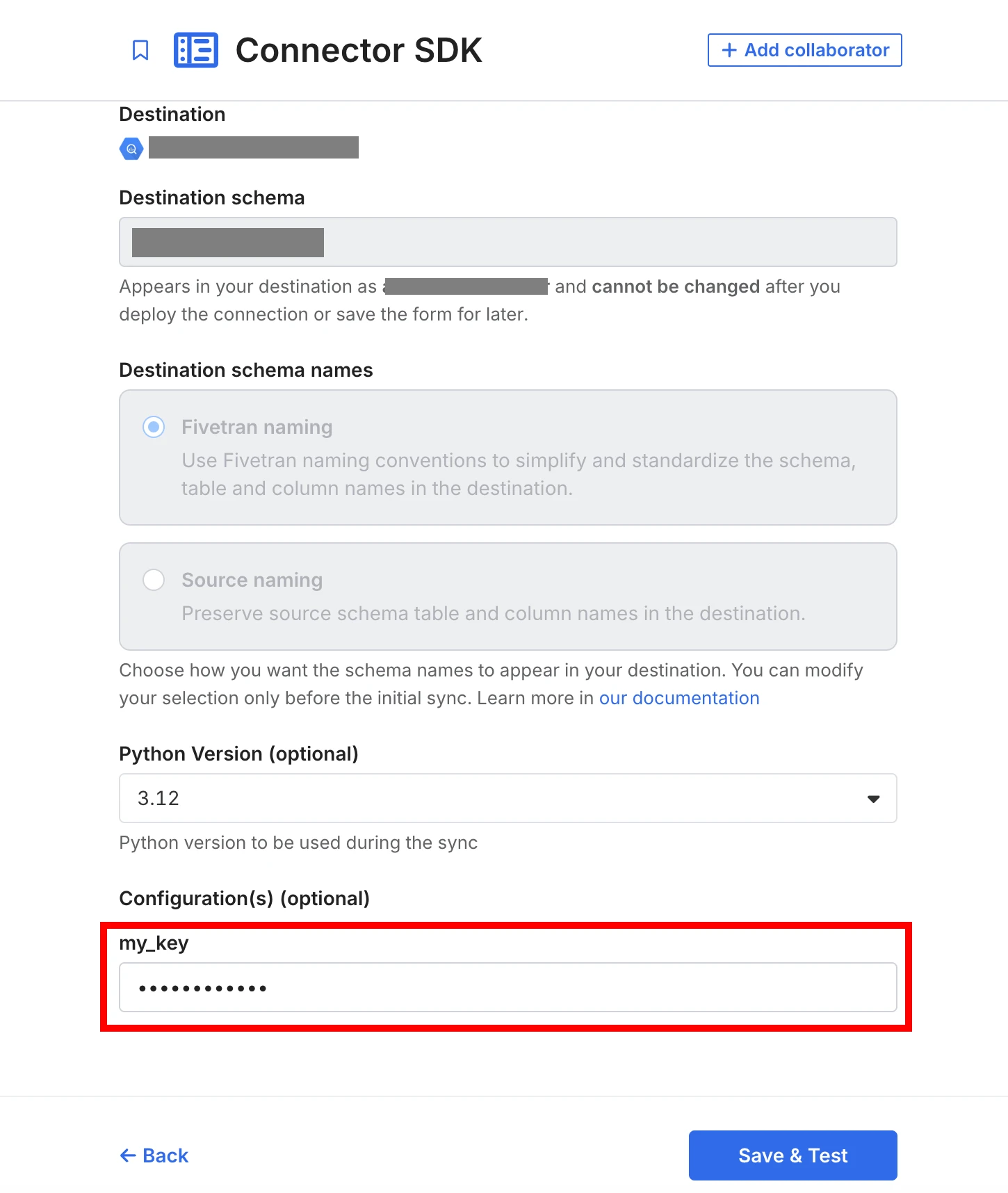
--configurationflag. Fivetran securely stores the values and associates them with your connection. - After deployment, the keys appear as editable fields in your connection's Settings tab under Configuration(s). Values are obfuscated for security.
Configuration fields do not appear in the Fivetran dashboard until after you deploy your connection with a configuration file. The setup form for a new Connector SDK connection does not include any configuration controls.
For example, if you deploy with the following configuration file:
{
  "my_key": "your_api_key_here"
}
After deployment, the my_key field appears under Configuration(s) in the Edit Connection form, where you can view and update its value:
Initial deployment steps
- Create a
configuration.jsonfile in your project's root directory. - Use it for deployment.
- Delete it after deployment (we do not store this file, and it should not be added to your code repository).
After deployment, you can edit the configuration values in the dashboard.
Format of configuration.json
The file must contain valid JSON with key-value pairs, where the only allowed type of values is STRING:
{
  "key1": "value1",
  "key2": "value2"
}
Using configuration.json
You can pass configuration values by referencing the configuration file using either absolute or relative path:
--configuration /Users/john.doe/example/config.json
--configuration ../../configuration.json
To avoid storing sensitive information locally in your configuration.json file, you can set values to empty strings before deploying. You can manage the values after deployment in your Fivetran dashboard.
Managing configuration after deployment
Once deployed, you can edit configuration values in the setup form of your connection. The latest values — whether edited in the dashboard or redeployed with configuration.json — will be used in all syncs. Any new value in configuration.json (even an empty string) overwrites existing values.
Providing --configuration during a deployment replaces any previous configuration. Omitting it keeps existing values.
Important notes
- Maximum 100 key-value pairs allowed.
- Only keys are visible in the Fivetran dashboard.
- Values are obfuscated for security.
- Configuration values are only available at runtime.
- Use this method to securely pass credentials like API keys.
- Do not hardcode credentials in your Python code to follow best security practices. If you have already uploaded such code, rotate the credentials immediately.
Example commands
To test your code locally with configuration values specified in configuration.json:
fivetran debug --configuration configuration.json
To deploy your connector with configuration values specified in configuration.json and a particular Python version:
fivetran deploy --api-key <BASE_64_ENCODED_API_KEY> --destination <DESTINATION_NAME> --connection <CONNECTION_NAME> --configuration configuration.json --python 3.12
You can deploy the same connector.py, referencing a different configuration file and specifying a different name each time, to create multiple connections.
Deploying the same connector.py with a different configuration file under the same name just overwrites the configuration values in the existing connection.
Configuration in different environments
How you supply configuration to your connector depends on how you run it. The Connector SDK supports several common workflows.
Running with the Fivetran CLI
When you run your connector using the Fivetran CLI, you can pass any configuration file path using the --configuration flag. For example:
fivetran debug --configuration configuration.json
fivetran debug --configuration /Users/john.doe/example/config.json
fivetran debug --configuration ../../configuration.json
The path may be absolute or relative. In this mode, the configuration file itself is read and managed by Fivetran, and your connector receives configuration as a dictionary argument in the schema() and update() methods.
Running directly from an IDE (advanced)
When you launch your connector by clicking Run in an IDE (for example, PyCharm or VS Code), the script executes like a normal Python program and the if __name__ == "__main__": block runs.
Our examples load configuration.json from the project directory in this mode so that they work out of the box without any IDE-specific setup.
If you prefer to choose a different configuration file while debugging inside your IDE, you can optionally use Python's built-in argparse module to accept a --config parameter. To use this pattern, replace the simple configuration loading inside your if __name__ == "__main__": block with the following:
import argparse
import json

if __name__ == "__main__":
    parser = argparse.ArgumentParser(description="Run the connector")
    parser.add_argument("--config", "-c", help="Path to a configuration file")
    args = parser.parse_args()

    if args.config:
        with open(args.config, "r") as f:
            configuration = json.load(f)
    else:
        with open("configuration.json", "r") as f:
            configuration = json.load(f)

    connector.debug(configuration=configuration)
Most IDEs provide a way to specify script arguments (for example, --config path/to/config.json) in their Run/Debug configuration dialogs. Refer to your IDE's documentation for details.
This IDE-based workflow is optional and primarily useful for advanced users who rely on full debugging features such as breakpoints and stepping through code.
Configuration in production
In production, Fivetran manages configuration for you and passes it as a dictionary to your connector's schema() and update() methods. The configuration.json file is not available in the production environment, and your code should read configuration only from the dictionaries provided to these methods.
Editing configuration values after deployment
Once you have deployed your connector, you can edit the configuration values in the dashboard:
- Go to the Settings tab of your connection page.
- Click Edit connection.
- Scroll to Configuration(s) and click the field you want to edit.
- Enter the new value.
- Click Save & Test to apply your changes.
Using configuration in your code
This section covers some common patterns for using configuration field values when you need to convert the data type from STRING:
- boolean
- list
- integer
- dict
Boolean
For example, let's say you have a RESYNC_ON field in configuration.json with value "SUNDAY". You can use it as a boolean in your Python code as follows:
if configuration['RESYNC_ON'].lower() == datetime.now().strftime('%A').lower():
    ... do something ...
One more example, let's say you have a include_all field in configuration.json with value "TRUE". You can use it as a boolean in your Python code as follows:
if configuration['include_all'] == 'TRUE':
    ... do something ...
List
For example, let's say you have a COUNTRIES field in configuration.json with value "NAM,APAC,EMEA". You can use it as a list in your Python code as follows:
country_codes = configuration['COUNTRIES'].split(",")
... do something...
Integer
For example, let's say you have an API_QUOTA field in configuration.json with value "12345". You can use it as an integer in your Python code as follows:
api_quota = int(configuration['API_QUOTA'])
...do something...
Dictionary
For example, let's say you have a CURRENCIES field in configuration.json with value "[{\"From\": \"USD\",\"To\": \"EUR\"},{\"From\": \"USD\",\"To\": \"GBP\"}]". You can use it as a dict in your Python code as follows:
parsed_json = json.loads(configuration['CURRENCIES'])
...do something...